中文 · English

Four web tools, each built to make one thing less annoying.

This is not a product suite or a traffic funnel. Each site solves one problem I kept running into: too many browser tabs for the sites I check every day, no reliable way to tell which AI tools actually work, no simple path from a photo to a usable 3D model, and no Markdown editor that lets you just start writing. All four can be tried without an account, and most support multiple languages.

4 sites Up to 13 languages No signup to try Maintained since 2025

SiteBox

sitebox.uzhzh.com

SiteBox workspace: a site list on the left and a grid of live website panes on the right, showing Baidu, Bilibili, Weibo and Douban side by side

A workspace that puts many websites into a single window. You keep a site list on the left, and the right side shows several sites in a grid at once. Every pane can be refreshed, expanded to full screen or closed on its own, and you can open the whole list in one click. It exists because the sites you visit every day should not cost you a strip of twenty tabs that you can never find again.

The difference from bookmarks is that bookmarks only show up when you go looking. A workspace is already there: the order, sizes and groupings are where you left them. It ships with preset groups (for example "Chinese AI assistants" or "collaborative docs") and you can build your own.

What it actually does

  • Grid multi-view: switch between 2×2 and 5 columns, expand any single pane, open up to 30 sites at once.
  • Groups and hotkeys: organize sites by purpose, assign shortcuts, filter by typing a keyword.
  • Shareable lists: turn a group into a link and the other person opens the same workspace.
  • 11 interface languages: Simplified and Traditional Chinese, English, Japanese, Korean, French, German, Spanish, Portuguese, Russian, Arabic.

One known limitation: some sites send X-Frame-Options or a content security policy that blocks embedding. Those show a notice inside the pane and have to be opened in their own window. That is the site owner's decision and cannot be worked around from the front end.

Open SiteBox

AI Tool Navigator

ainav.uzhzh.com

AI Tool Navigator homepage with a search box, hot-pick cards and a category sidebar listing 46 chat tools, 64 writing tools, 124 image tools

A directory of more than 5,200 AI tools across 17 categories: chat, writing, image, video, audio, search, productivity, coding, design, translation, learning, agents, models, business, content detection, prompts and other workflows. Every tool is tagged by the region it belongs to, so you can look at Chinese tools only or international tools only. That filter sounds trivial but it is the most useful one on the site: whether a tool is reachable, needs a credit card, or handles your language usually decides more than how impressive its feature list is.

The reason it exists: most AI directory sites list a name and one English sentence, and you only find out after clicking that it requires a company email or has no Chinese support. Each entry here tries to carry a short description of what the tool actually does, separated by region, so you do not have to find out by trial and error.

What it actually does

  • Two-axis filtering: 17 categories plus a Chinese / international switch, so you never scroll through tools you cannot use.
  • Individual tool pages: each tool gets its own page with purpose, category, region and a direct link to the official site.
  • 13 language versions: Chinese, English, Japanese, Korean, French, German, Spanish, Portuguese, Italian, Russian, Arabic, Vietnamese, Thai — each with its own URL and localized copy.
  • No login: browsing, searching and outbound links all work without an account, and there is no forced signup modal.

Inclusion criteria: the site loads, it has a real AI capability, and it is not just a landing page. Ranking is not for sale; order comes from category and usage. Broken links can be reported from inside the site and are cleaned up periodically.

Browse AI Tool Navigator

Image to 3D

3d.uzhzh.com

Image to 3D homepage: headline reading turn any image into a professional 3D asset, with 2048 max resolution, five output formats and fail-refund listed below

Upload one image and get a downloadable 3D model a few minutes later. Up to 2048 resolution, exported as OBJ, FBX, GLB, STL or USDZ — the first three for rendering and game engines, STL goes straight into a slicer for 3D printing, and USDZ drops into an iPhone for AR viewing. You can spin the result in the browser before downloading anything.

The traditional path is photograph, model, unwrap UVs, texture — most of a day for a single small object. This pipeline compresses "I have a photo" into "I have a usable model file" to about fifteen minutes, which is enough for e-commerce display, 3D printing and game prototyping, where film-grade accuracy is not the requirement.

What it actually does

  • Single image input: no multi-angle photo rig, one clear picture is enough.
  • Two modes: general mode for full bodies, objects and scenes; portrait mode tuned for heads and faces.
  • Tiered pricing: credits scale with output resolution, so you are not forced into an all-you-can-eat plan.
  • Automatic refund on failure: credits return to your balance without a support ticket.

Where it stops: this reconstructs shape from an image; it does not invent objects from text. Parts the camera cannot see — backs, internal structure — are inferred and will be off on complex machinery or transparent materials. Parts that need exact dimensions still need real modelling.

Try Image to 3D

Markdown-Online

mdonline.uzhzh.com

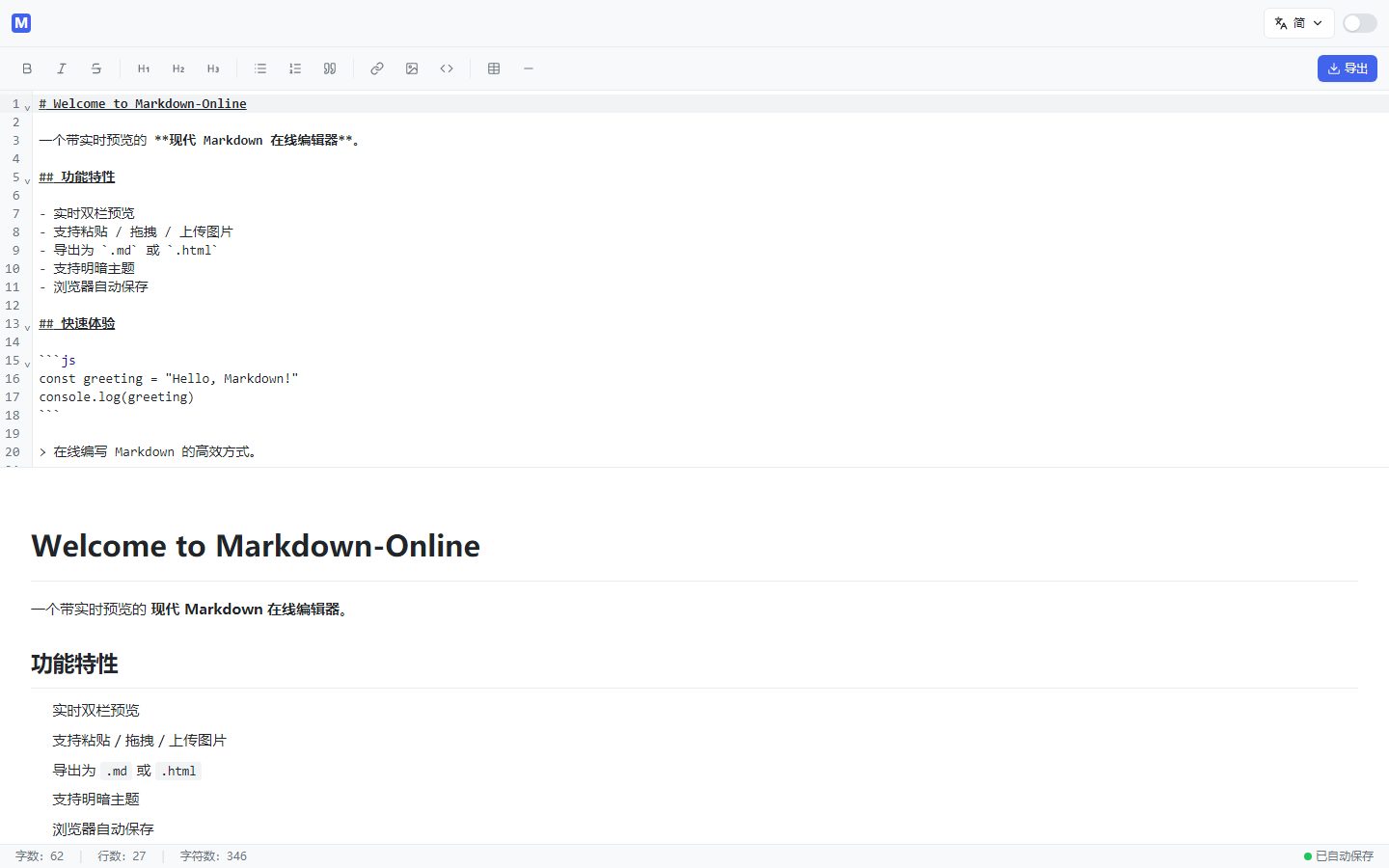
Markdown-Online editor: Markdown source with line numbers on the left, live rendered preview on the right, formatting toolbar across the top

An online Markdown editor that is ready the moment it loads: source on the left, live preview on the right, no signup, no new-file dialog, no template picker. What you write is saved in your browser automatically, so closing the tab and coming back later keeps it. Paste, drag or upload images; switch between light and dark themes; export as .md or .html when you are done.

Why build yet another Markdown editor? Because "I just want to write something down" usually gets blocked by a login screen, a repository, or cloud sync you did not ask for. The default here is local, private, and immediate: there is no account system, so there is no content upload either.

What it actually does

  • Synced dual pane: headings, bold and italic, lists, quotes, code blocks, tables, links and dividers, all from the toolbar.
  • Autosave in the browser: content lives in IndexedDB, surviving refreshes and closed tabs.
  • Paste images directly: drag or paste, images embed as base64 so exports never lose them.
  • Export to md or html: the exported HTML carries its own styling and can be sent to someone as-is.

Where it stops: it is a single-file editor. No folder tree, no collaboration, no cloud sync. Long documents that need version history or multiple authors belong in a Git repository or a real collaboration tool.

Start writing Markdown

About these sites

All four are built and maintained by one developer. The code and the servers are mine. There is no funding, no growth team, and no plan to sell user data to a third party — most features do not even need an account, so there is nothing to sell.

The business model is simple: tools are either free or pay-per-use (Image to 3D charges credits by output resolution). No paid rankings, no disguised ad slots, no "sign up to see your result" wall. If a site has to shut down, it will be announced in advance and the domain will not be flipped to someone else.

Why four separate sites

Each one has a different language set, release cadence and server load. Under one domain they would hold each other back.

How the languages work

Not machine translation of the whole site. UI copy is maintained per language, and each language gets its own HTML and URL so search engines can index it separately.

Data and privacy

Markdown and SiteBox data stay in your own browser. Image to 3D uploads an image for generation and uses it only for that task.